Home About Privacy Terms Get the app
Live on iPhone · Apple Watch · CarPlay

Never lose
your car.

Follow the arrow — straight back to your car.

Download on the App Store
Free · In-App Purchases · iPhone, Apple Watch & CarPlay
Works with Tesla BMW Mercedes Hyundai Kia Tesla, BMW, Mercedes, Honda & many more
How it works

You park. We remember.

From opening the app to seeing your car live — the whole flow is built to be effortless.

01

Add your car

Pick your brand and model. A quick, guided setup.

02

Just drive

Park like you always do. No buttons to press.

03

Spot auto-saved

Carvia detects when you've parked and drops a pin.

04

Find it

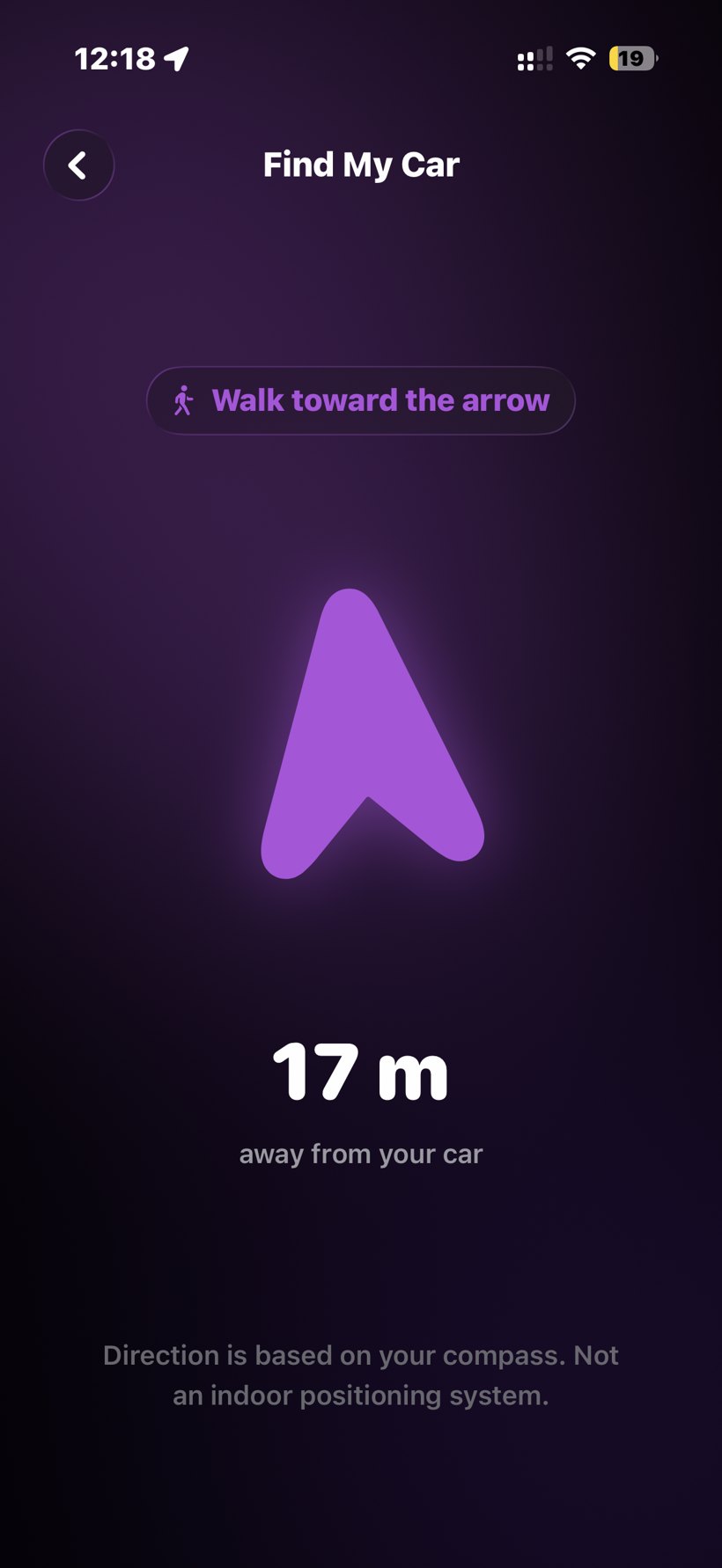
Tap Find My Car and follow the arrow back, meter by meter.

Features

Everything you need
to find your car.

Carvia focuses on doing one thing exceptionally well: getting you back to your car, fast.

Find My Car

A large arrow and live distance guide you back, meter by meter, until you're standing right next to it.

Automatic detection

Carvia knows when your drive ends and saves the spot — no tapping required.

Parking history

Every place you've parked, remembered with address, time and duration.

Your garage

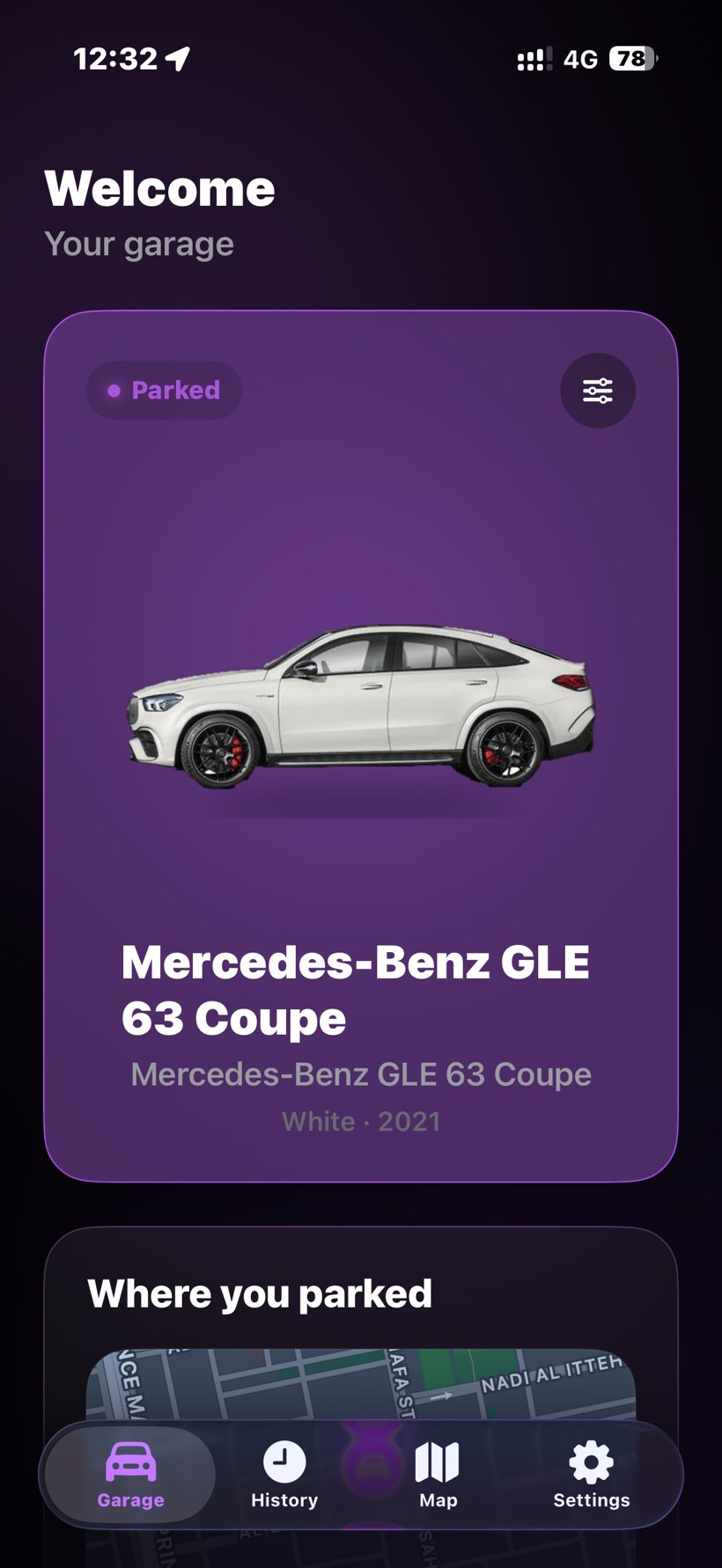
A beautiful home for your cars — manage several vehicles in one garage, each with live parked status.

Works with CarPlay

Carvia starts the moment your drive ends and your car disconnects.

On your wrist

Find your car straight from your Apple Watch.

Private by design

Your parking locations stay yours — tied to your private account, never sold, with no hardware and no clutter.

Your car

Works with any car.

30 brands and 220+ models built in — Tesla, BMW, Mercedes-Benz, Toyota and more. And with manual save, absolutely any car.

AcuraAudiDodgeFiatGeelyGMCHyundaiJeepLamborghiniLexusMercedes-BenzMININissanTeslaVolkswagen
Aston MartinBMWFerrariFordGenesisHondaJaguarKiaLand RoverMazdaMGMitsubishiPorscheToyotaVolvo
Carvia — Your garage screen
Your garage

A home for your car.

Open Carvia to see your car, its parked status, and exactly where you left it.

  • Live parked status

    See at a glance whether your car is parked and where.

  • One tap to find it

    Find My Car launches the arrow that walks you back.

  • Your whole history

    Scroll back through every place you've ever parked.

Carvia — Find My Car
Automatic

It updates the moment your car moves.

With CarPlay, your car's Bluetooth, or no connection at all, Carvia detects when your drive ends and records the location — so you never have to remember.

1
Your drive ends

CarPlay disconnects — or Carvia simply notices you stopped and walked away.

2
Spot auto-saved

Carvia drops a pin at your exact location.

3
Ready to find

Open Find My Car whenever you're ready to walk back.

Languages

Carvia speaks your language.

Choose your language before you begin. Arabic is fully right-to-left, the way it should be.

🇸🇦

العربية

Arabic · RTL

🇬🇧

English

English

🇮🇹

Italiano

Italian

🇪🇸

Español

Spanish

Private & secure

Your parking locations are yours alone. Nothing is sold, ever.

Effortless

No buttons, no hardware. It just works quietly in the background.

Everywhere you are

iPhone, Apple Watch and CarPlay — in four languages.

FAQ

Find My Car — FAQ

Everything about finding your parked car with Carvia.

How do I find my parked car with Carvia?

Carvia automatically remembers where you parked using your iPhone's location and motion sensors. When you're ready to head back, open the app and follow the on-screen arrow that points straight to your car.

Does Carvia work with CarPlay?

Yes. Carvia uses CarPlay and Bluetooth to detect when you disconnect and park, so your spot is saved automatically — and you can always save it manually.

Does the Find My Car arrow use GPS?

Yes — the arrow combines GPS with your iPhone's compass to point toward your car and show the live distance as you walk back.

Can it help me find my car in a big parking garage?

Carvia saves your exact spot and guides you with the arrow and map. In covered garages GPS can drift, so it works best alongside the floor or section you remember.

Is Carvia free? Is there a subscription?

Carvia is free to download — and every Premium feature is free to try for 3 days. After that, Premium is a one-time purchase (Carvia Premium Lifetime) — no subscription, no ads, no tracking, and nothing is charged when the trial ends.

Does Carvia track me or share my location?

No. Carvia is private and on-device. Your parking data stays on your iPhone — nothing is uploaded or sold.

Never lose your car again.

Download Carvia free and find your car the moment you need it.

Download on the App Store
Free · In-App Purchases · iPhone, Apple Watch & CarPlay